Monday, November 27, 2006

Password Validation

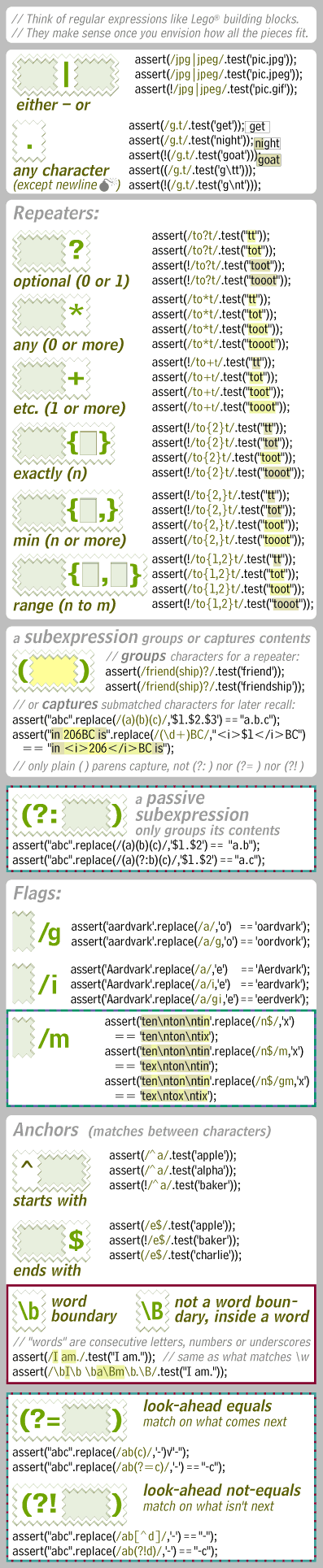
When it comes to password validation using regular expressions, things can get a bit complicated. Normally, you want people to enter a "good" password that has a mix of numbers and letters. But you may not care where the numbers and letters appear. So you're not looking for a "pattern" in the string. You just want a letter somewhere and a number somewhere.

In this first example, the password must be at least 8 characters long and start and end with a letter.

var re = /^[A-Za-z]\w{6,}[A-Za-z]$/;
if (!re.test(myString)) { alert("Please enter a valid password!"); }

The ^ looks for something at the start of the string. The brackets indicate the valid character set. So it must start with an upper or lower case letter. After that, the \w means there can be valid alphanumeric characters (numbers 0-9, upper/lower case letters a-z, the underscore) and says there must be at least 6 (but no upper limit). Then comes another set and the $ looks for something at the end of the string. So this statement says there must be a letter, then at least 6 of any alphanumeric characters, then a letter (making 8 the minimum number of characters).

In this second example, the password length doesn't matter, but the password must contain at least 1 number, at least 1 lower case letter, and at least 1 upper case letter.

var re = /^\w*(?=\w*\d)(?=\w*[a-z])(?=\w*[A-Z])\w*$/
if (!re.test(myString)) { alert("Please enter a valid password!"); }

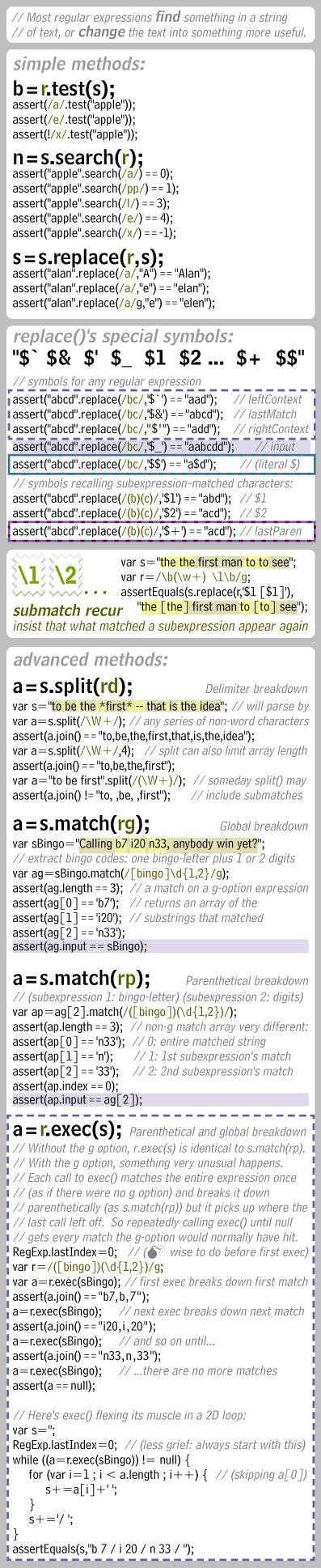
Again, the ^ and $ are looking for things at the start and end. The "\w*" combination is used at both the start and the end. \w means any alphanumeric character, and * means zero or more. You'll see why it's "zero or more" in a bit. Between are groupings in parentheses. The "(?" combination is a flag in regular expressions. Basically, they say "apply the following formula, but don't consume any of the string". In this example, instead of specifying the order that things should appear, it's saying that it must appear but we're not worried about the order.

The first grouping (called an "atom" in "regular expresion speak") uses the = sign. This means that there must be a match. Other choices are ! for a negative match (the string must not look like this). There are others (more complicated) for preceeding matches and stuff. We can refer you to a regular expression syntax web site for further details.

After the = sign comes "\w*\d". Again, any alphanumeric character can happen zero or more times, then any digit (\d means any digit from 0 to 9) can happen. So this checks to see if there is at least one number in the string. But since the string isn't comsumed, that one digit can appear anywhere in the string.

The next atom (grouping) is (?=\w*[a-z]). This is similar to the digit grouping, except it looks for a lower case letter. Again, the lower case letter can appear anywhere, but there has to be at least one.

The third atom is (?=\w*[A-Z]) which looks for an upper case letter somewhere in the string.

Finally, at the end is zero or more alphanumeric characters. To match this string, the minimum characters needed is 3 (one upper case letter, one lower case letter, and one number).

http://www.breakingpar.com/bkp/...

Saturday, November 25, 2006

How to make a dynamic TOOLTIP

Popup a help tip or information layer onmouseover using this object-based DHTML tooltip code. The basic version, presented on this page, can contain plain text or rich html, images, or images and text. The tooltip can be displayed over a background image. It can move with mouse movement. And it is easy to customize and modify.
Content to be displayed in the tooltip can be passed from the onmouseover event handler itself, or it can be contained in global variables or arrays, or it can be dynamically generated, for example, from database query results.


For Eg visit: http://www.dyn-web.com/dhtml/tooltips/

How to create popup on defined size for an hyperlink

Lets asume we have an asp hyperlink control named/id "HyperLink_Download" in your page. And when u click it u want to open a popup with a defined size in another window, and it should not show the link properties in status bar.


Here is an example.
HyperLink_Download.Attributes.Add("onclick",
"DownloadFile_Handle=window.open('URL',
'DownloadFile',
'resizable=no, scrollbars=no, status=no, toolbar=no, height=1, width=1, left=1, top=1 '); DownloadFile_Handle.close(); return true;");
HyperLink_Download.Attributes.Add("onmouseover", "window.status='Click Here to Download File.';return true");
HyperLink_Download.Attributes.Add("onmouseout", "window.status=''; return true;");


DownloadFile_Handle : It is the handle for the opoup so that u can do any action if you want with it.
DownloadFile : this is the target location where the popup will open. if u have any target location like this the popup willopen in that if not it will open in a new window.
the best thing is that even though u clicked the same link more than one time, u wont be getting diffrent popup, the same popup which is opened will reload again and again

Friday, August 25, 2006

How to create a database with previous data from a backup file(.bak)?

Situation: U have only a backup file of a database abcdatabase with extension of .bak (abcdatabase.bak), and u want to create a database called abcdatabase with the data with are in bak files.


Things to remember :
Database Name : abcdatabase
Backupfile Name : abcdatabase.bak
SQL SERVER NAME: your system name is it is local (EG: PRINCEPY)

Step 1: open command prompt
Step 2: create a blank database with a name"abcdatabase", and close query analyser and sql manager etc.
Step 3: navigate to "C:\Program Files\Microsoft SQL Server\MSSQL\Binn>"
Step 4: use "osql" type "osql /?" for help
SYNTAX : > osql [-U login id] [-P password] [-H hostname]
EQ : > osql -U sa -P -H PRINCEPY
Step 5: you will ge "1>" in cmd, type the following
1> RESTORE DATABASE abcdatabase FROM DISK='c:\abcdatabase.bak'
2> GO
Step 6: After sucessfull creatio type EXIT

Thursday, February 02, 2006

Stored Procedure in SQL Server to Create A Stored Procedure for 'INSERT' , 'UPDATE' , 'DELETE' , 'SELECT' values into/from a Table

Conditions
1) Table Should Have A Primary Key

User Defined Function in Support to the Real Stored Procedure....
1) fnCleanDefaultValue
2) fnColumnDefault
3) fnIsColumnPrimaryKey
4) fnTableColumnInfo
5) fnTableHasPrimaryKey


SET QUOTED_IDENTIFIER ON
GO
SET ANSI_NULLS ON
GO

CREATE FUNCTION dbo.fnCleanDefaultValue
(@sDefaultValue varchar(4000))
RETURNS varchar(4000)
AS
BEGIN
RETURN SubString(@sDefaultValue, 2, DataLength(@sDefaultValue)-2)
END


CREATE FUNCTION dbo.fnColumnDefault
(@sTableName varchar(128),
@sColumnName varchar(128))
RETURNS varchar(4000)
AS
BEGIN
DECLARE @sDefaultValue varchar(4000)
SELECT @sDefaultValue = dbo.fnCleanDefaultValue(COLUMN_DEFAULT) FROM INFORMATION_SCHEMA.COLUMNS
WHERE TABLE_NAME = @sTableName AND COLUMN_NAME = @sColumnName
RETURN @sDefaultValue
END

CREATE FUNCTION dbo.fnIsColumnPrimaryKey
(@sTableName varchar(128),
@nColumnName varchar(128))
RETURNS bit
AS
BEGIN
DECLARE @nTableID int,
@nIndexID int,
@i int
SET @nTableID = OBJECT_ID(@sTableName)
SELECT @nIndexID = indid
FROM sysindexes
WHERE id = @nTableID AND indid BETWEEN 1 And 254 AND (status & 2048) = 2048
IF @nIndexID IsNull
RETURN 0
IF @nColumnName IN
(SELECT sc.[name] FROM sysindexkeys sik
INNER JOIN syscolumns sc ON sik.id = sc.id AND sik.colid = sc.colid
WHERE sik.id = @nTableID AND sik.indid = @nIndexID)
BEGIN
RETURN 1
END
RETURN 0
END


CREATE FUNCTION dbo.fnTableColumnInfo
(@sTableName varchar(128))
RETURNS TABLE
AS

BEGIN
RETURN
SELECT c.name AS sColumnName,

c.colid AS nColumnID,
dbo.fnIsColumnPrimaryKey(@sTableName, c.name) AS bPrimaryKeyColumn,
CASE
WHEN t.name IN ('char', 'varchar', 'binary', 'varbinary', 'nchar', 'nvarchar') THEN 1
WHEN t.name IN ('decimal', 'numeric') THEN 2
ELSE 0
END AS nAlternateType,
c.length AS nColumnLength,
c.prec AS nColumnPrecision,
c.scale AS nColumnScale,
c.IsNullable,
SIGN(c.status & 128) AS IsIdentity,
t.name as sTypeName,
dbo.fnColumnDefault(@sTableName, c.name) AS sDefaultValue

FROM syscolumns c
INNER JOIN systypes t ON c.xtype = t.xtype and c.usertype = t.usertype
WHERE c.id = OBJECT_ID(@sTableName)
END


CREATE FUNCTION dbo.fnTableHasPrimaryKey

(@sTableName varchar(128))
RETURNS bit
AS
BEGIN
DECLARE @nTableID int,
@nIndexID int
SET @nTableID = OBJECT_ID(@sTableName)
SELECT @nIndexID = indid

FROM sysindexes
WHERE id = @nTableID AND indid BETWEEN 1 And 254 AND (status & 2048) = 2048
IF @nIndexID ISNOTNull
RETURN 1
RETURN 0
END

GO
SET QUOTED_IDENTIFIER OFF
GO
SET ANSI_NULLS ON
GO


SET QUOTED_IDENTIFIER ON
GO
SET ANSI_NULLS ON
GO

CREATE PROC pr__SYS_MakeDeleteRecordProc
@sTableName varchar(128),
@bExecute bit = 0
AS
BEGIN
IF dbo.fnTableHasPrimaryKey(@sTableName) = 0
BEGIN
RAISERROR ('Procedure cannot be created on a table with no primary key.', 10, 1)
RETURN
END

DECLARE @sProcText varchar(8000),
@sKeyFields varchar(2000),
@sWhereClause varchar(2000),
@sColumnName varchar(128),
@nColumnID smallint,
@bPrimaryKeyColumn bit,
@nAlternateType int,
@nColumnLength int,
@nColumnPrecision int,
@nColumnScale int,
@IsNullable bit,
@IsIdentity int,
@sTypeName varchar(128),
@sDefaultValue varchar(4000),
@sCRLF char(2),
@sTAB char(1)

SET @sTAB = char(9)
SET @sCRLF = char(13) + char(10)

SET @sProcText = ''
SET @sKeyFields = ''
SET @sWhereClause = ''

SET @sProcText = @sProcText + 'IF EXISTS(SELECT * FROM sysobjects WHERE name = ''sp_Delete_' + @sTableName + ''')' + @sCRLF
SET @sProcText = @sProcText + @sTAB + 'DROP PROC sp_Delete_' + @sTableName + @sCRLF
IF @bExecute = 0
SET @sProcText = @sProcText + 'GO' + @sCRLF

SET @sProcText = @sProcText + @sCRLF

PRINT @sProcText

IF @bExecute = 1
EXEC (@sProcText)

SET @sProcText = ''
SET @sProcText = @sProcText + '----------------------------------------------------------------------------' + @sCRLF
SET @sProcText = @sProcText + '-- Delete a single record from ' + @sTableName + @sCRLF
SET @sProcText = @sProcText + '----------------------------------------------------------------------------' + @sCRLF
SET @sProcText = @sProcText + 'CREATE PROC sp_Delete_' + @sTableName + @sCRLF

DECLARE crKeyFields cursor for
SELECT *
FROM dbo.fnTableColumnInfo(@sTableName)
ORDER BY 2

OPEN crKeyFields

FETCH NEXT
FROM crKeyFields
INTO @sColumnName, @nColumnID, @bPrimaryKeyColumn, @nAlternateType,
@nColumnLength, @nColumnPrecision, @nColumnScale, @IsNullable,
@IsIdentity, @sTypeName, @sDefaultValue

WHILE (@@FETCH_STATUS = 0)
BEGIN

IF (@bPrimaryKeyColumn = 1)
BEGIN
IF (@sKeyFields <> '')
SET @sKeyFields = @sKeyFields + ',' + @sCRLF

SET @sKeyFields = @sKeyFields + @sTAB + '@' + @sColumnName + ' ' + @sTypeName

IF (@nAlternateType = 2) --decimal, numeric
SET @sKeyFields = @sKeyFields + '(' + CAST(@nColumnPrecision AS varchar(3)) + ', '
+ CAST(@nColumnScale AS varchar(3)) + ')'

ELSE IF (@nAlternateType = 1) --character and binary
SET @sKeyFields = @sKeyFields + '(' + CAST(@nColumnLength AS varchar(4)) + ')'

IF (@sWhereClause = '')
SET @sWhereClause = @sWhereClause + 'WHERE '
ELSE
SET @sWhereClause = @sWhereClause + ' AND '

SET @sWhereClause = @sWhereClause + @sTAB + @sColumnName + ' = @' + @sColumnName + @sCRLF
END

FETCH NEXT
FROM crKeyFields
INTO @sColumnName, @nColumnID, @bPrimaryKeyColumn, @nAlternateType,
@nColumnLength, @nColumnPrecision, @nColumnScale, @IsNullable,
@IsIdentity, @sTypeName, @sDefaultValue
END

CLOSE crKeyFields
DEALLOCATE crKeyFields

SET @sProcText = @sProcText + @sKeyFields + @sCRLF
SET @sProcText = @sProcText + 'AS' + @sCRLF
SET @sProcText = @sProcText + @sCRLF
SET @sProcText = @sProcText + 'DELETE ' + @sTableName + @sCRLF
SET @sProcText = @sProcText + @sWhereClause
SET @sProcText = @sProcText + @sCRLF
IF @bExecute = 0
SET @sProcText = @sProcText + 'GO' + @sCRLF


PRINT @sProcText

IF @bExecute = 1
EXEC (@sProcText)
END
GO
SET QUOTED_IDENTIFIER OFF
GO
SET ANSI_NULLS ON
GO

SET QUOTED_IDENTIFIER ON
GO
SET ANSI_NULLS ON
GO

CREATE PROC pr__SYS_MakeInsertRecordProc
@sTableName varchar(128),
@bExecute bit = 0
AS

IF dbo.fnTableHasPrimaryKey(@sTableName) = 0
BEGIN
RAISERROR ('Procedure cannot be created on a table with no primary key.', 10, 1)
RETURN
END

DECLARE @sProcText varchar(8000),
@sKeyFields varchar(2000),
@sAllFields varchar(2000),
@sAllParams varchar(2000),
@sWhereClause varchar(2000),
@sColumnName varchar(128),
@nColumnID smallint,
@bPrimaryKeyColumn bit,
@nAlternateType int,
@nColumnLength int,
@nColumnPrecision int,
@nColumnScale int,
@IsNullable bit,
@IsIdentity int,
@HasIdentity int,
@sTypeName varchar(128),
@sDefaultValue varchar(4000),
@sCRLF char(2),
@sTAB char(1)

SET @HasIdentity = 0
SET @sTAB = char(9)
SET @sCRLF = char(13) + char(10)
SET @sProcText = ''
SET @sKeyFields = ''
SET @sAllFields = ''
SET @sWhereClause = ''
SET @sAllParams = ''

SET @sProcText = @sProcText + 'IF EXISTS(SELECT * FROM sysobjects WHERE name = ''sp_Add_' + @sTableName + ''')' + @sCRLF
SET @sProcText = @sProcText + @sTAB + 'DROP PROC sp_Add_' + @sTableName + @sCRLF
IF @bExecute = 0
SET @sProcText = @sProcText + 'GO' + @sCRLF

SET @sProcText = @sProcText + @sCRLF

PRINT @sProcText

IF @bExecute = 1
EXEC (@sProcText)

SET @sProcText = ''
SET @sProcText = @sProcText + '----------------------------------------------------------------------------' + @sCRLF
SET @sProcText = @sProcText + '-- Insert a single record into ' + @sTableName + @sCRLF
SET @sProcText = @sProcText + '----------------------------------------------------------------------------' + @sCRLF
SET @sProcText = @sProcText + 'CREATE PROC sp_Add_' + @sTableName + @sCRLF

DECLARE crKeyFields cursor for
SELECT *
FROM dbo.fnTableColumnInfo(@sTableName)
ORDER BY 2

OPEN crKeyFields


FETCH NEXT
FROM crKeyFields
INTO @sColumnName, @nColumnID, @bPrimaryKeyColumn, @nAlternateType,
@nColumnLength, @nColumnPrecision, @nColumnScale, @IsNullable,
@IsIdentity, @sTypeName, @sDefaultValue

WHILE (@@FETCH_STATUS = 0)
BEGIN
IF (@IsIdentity = 0)
BEGIN
IF (@sKeyFields <> '')
SET @sKeyFields = @sKeyFields + ',' + @sCRLF

SET @sKeyFields = @sKeyFields + @sTAB + '@' + @sColumnName + ' ' + @sTypeName

IF (@sAllFields <> '')
BEGIN
SET @sAllParams = @sAllParams + ', '
SET @sAllFields = @sAllFields + ', '
END

IF (@sTypeName = 'timestamp')
SET @sAllParams = @sAllParams + 'NULL'
ELSE IF (@sDefaultValue IS NOT NULL)
SET @sAllParams = @sAllParams + 'COALESCE(@' + @sColumnName + ', ' + @sDefaultValue + ')'
ELSE
SET @sAllParams = @sAllParams + '@' + @sColumnName

SET @sAllFields = @sAllFields + @sColumnName

END
ELSE
BEGIN
SET @HasIdentity = 1
END

IF (@nAlternateType = 2) --decimal, numeric
SET @sKeyFields = @sKeyFields + '(' + CAST(@nColumnPrecision AS varchar(3)) + ', '
+ CAST(@nColumnScale AS varchar(3)) + ')'

ELSE IF (@nAlternateType = 1) --character and binary
SET @sKeyFields = @sKeyFields + '(' + CAST(@nColumnLength AS varchar(4)) + ')'

IF (@IsIdentity = 0)
BEGIN
IF (@sDefaultValue IS NOT NULL) OR (@IsNullable = 1) OR (@sTypeName = 'timestamp')
SET @sKeyFields = @sKeyFields + ' = NULL'
END

FETCH NEXT
FROM crKeyFields
INTO @sColumnName, @nColumnID, @bPrimaryKeyColumn, @nAlternateType,
@nColumnLength, @nColumnPrecision, @nColumnScale, @IsNullable,
@IsIdentity, @sTypeName, @sDefaultValue
END

CLOSE crKeyFields
DEALLOCATE crKeyFields

SET @sProcText = @sProcText + @sKeyFields + @sCRLF
SET @sProcText = @sProcText + 'AS' + @sCRLF
SET @sProcText = @sProcText + @sCRLF
SET @sProcText = @sProcText + 'INSERT ' + @sTableName + '(' + @sAllFields + ')' + @sCRLF
SET @sProcText = @sProcText + 'VALUES (' + @sAllParams + ')' + @sCRLF
SET @sProcText = @sProcText + @sCRLF

IF (@HasIdentity = 1)
BEGIN
SET @sProcText = @sProcText + 'RETURN SCOPE_IDENTITY()' + @sCRLF
SET @sProcText = @sProcText + @sCRLF
END

IF @bExecute = 0
SET @sProcText = @sProcText + 'GO' + @sCRLF


PRINT @sProcText

IF @bExecute = 1
EXEC (@sProcText)


GO
SET QUOTED_IDENTIFIER OFF
GO
SET ANSI_NULLS ON
GO

SET QUOTED_IDENTIFIER ON
GO
SET ANSI_NULLS ON
GO

CREATE PROC pr__SYS_MakeSelectRecordProc
@sTableName varchar(128),
@bExecute bit = 0
AS

IF dbo.fnTableHasPrimaryKey(@sTableName) = 0
BEGIN
RAISERROR ('Procedure cannot be created on a table with no primary key.', 10, 1)
RETURN
END

DECLARE @sProcText varchar(8000),
@sKeyFields varchar(2000),
@sSelectClause varchar(2000),
@sWhereClause varchar(2000),
@sColumnName varchar(128),
@nColumnID smallint,
@bPrimaryKeyColumn bit,
@nAlternateType int,
@nColumnLength int,
@nColumnPrecision int,
@nColumnScale int,
@IsNullable bit,
@IsIdentity int,
@sTypeName varchar(128),
@sDefaultValue varchar(4000),
@sCRLF char(2),
@sTAB char(1)

SET @sTAB = char(9)
SET @sCRLF = char(13) + char(10)

SET @sProcText = ''
SET @sKeyFields = ''
SET @sSelectClause = ''
SET @sWhereClause = ''

SET @sProcText = @sProcText + 'IF EXISTS(SELECT * FROM sysobjects WHERE name = ''sp_Select_' + @sTableName +''')' + @sCRLF
SET @sProcText = @sProcText + @sTAB + 'DROP PROC sp_Select_' + @sTableName + @sCRLF
IF @bExecute = 0
SET @sProcText = @sProcText + 'GO' + @sCRLF

SET @sProcText = @sProcText + @sCRLF

PRINT @sProcText

IF @bExecute = 1
EXEC (@sProcText)

SET @sProcText = ''
SET @sProcText = @sProcText + '----------------------------------------------------------------------------' + @sCRLF
SET @sProcText = @sProcText + '-- Select a single record from ' + @sTableName + @sCRLF
SET @sProcText = @sProcText + '----------------------------------------------------------------------------' + @sCRLF
SET @sProcText = @sProcText + 'CREATE PROC sp_Select_' + @sTableName + @sCRLF

DECLARE crKeyFields cursor for
SELECT *
FROM dbo.fnTableColumnInfo(@sTableName)
ORDER BY 2

OPEN crKeyFields

FETCH NEXT
FROM crKeyFields
INTO @sColumnName, @nColumnID, @bPrimaryKeyColumn, @nAlternateType,
@nColumnLength, @nColumnPrecision, @nColumnScale, @IsNullable,
@IsIdentity, @sTypeName, @sDefaultValue

WHILE (@@FETCH_STATUS = 0)
BEGIN
IF (@bPrimaryKeyColumn = 1)
BEGIN
IF (@sKeyFields <> '')
SET @sKeyFields = @sKeyFields + ',' + @sCRLF

SET @sKeyFields = @sKeyFields + @sTAB + '@' + @sColumnName + ' ' + @sTypeName

IF (@nAlternateType = 2) --decimal, numeric
SET @sKeyFields = @sKeyFields + '(' + CAST(@nColumnPrecision AS varchar(3)) + ', '
+ CAST(@nColumnScale AS varchar(3)) + ')'

ELSE IF (@nAlternateType = 1) --character and binary
SET @sKeyFields = @sKeyFields + '(' + CAST(@nColumnLength AS varchar(4)) + ')'

IF (@sWhereClause = '')
SET @sWhereClause = @sWhereClause + 'WHERE '
ELSE
SET @sWhereClause = @sWhereClause + ' AND '

SET @sWhereClause = @sWhereClause + @sTAB + @sColumnName + ' = @' + @sColumnName + @sCRLF
END

IF (@sSelectClause = '')
SET @sSelectClause = @sSelectClause + 'SELECT'
ELSE
SET @sSelectClause = @sSelectClause + ',' + @sCRLF

SET @sSelectClause = @sSelectClause + @sTAB + @sColumnName

FETCH NEXT
FROM crKeyFields
INTO @sColumnName, @nColumnID, @bPrimaryKeyColumn, @nAlternateType,
@nColumnLength, @nColumnPrecision, @nColumnScale, @IsNullable,
@IsIdentity, @sTypeName, @sDefaultValue
END

CLOSE crKeyFields
DEALLOCATE crKeyFields

SET @sSelectClause = @sSelectClause + @sCRLF

SET @sProcText = @sProcText + @sKeyFields + @sCRLF
SET @sProcText = @sProcText + 'AS' + @sCRLF
SET @sProcText = @sProcText + @sCRLF
SET @sProcText = @sProcText + @sSelectClause
SET @sProcText = @sProcText + 'FROM ' + @sTableName + @sCRLF
SET @sProcText = @sProcText + @sWhereClause
SET @sProcText = @sProcText + @sCRLF
IF @bExecute = 0
SET @sProcText = @sProcText + 'GO' + @sCRLF


PRINT @sProcText

IF @bExecute = 1
EXEC (@sProcText)


GO
SET QUOTED_IDENTIFIER OFF
GO
SET ANSI_NULLS ON
GO

SET QUOTED_IDENTIFIER ON
GO
SET ANSI_NULLS ON
GO

CREATE PROC pr__SYS_MakeUpdateRecordProc
@sTableName varchar(128),
@bExecute bit = 0
AS

IF dbo.fnTableHasPrimaryKey(@sTableName) = 0
BEGIN
RAISERROR ('Procedure cannot be created on a table with no primary key.', 10, 1)
RETURN
END

DECLARE @sProcText varchar(8000),
@sKeyFields varchar(2000),
@sSetClause varchar(2000),
@sWhereClause varchar(2000),
@sColumnName varchar(128),
@nColumnID smallint,
@bPrimaryKeyColumn bit,
@nAlternateType int,
@nColumnLength int,
@nColumnPrecision int,
@nColumnScale int,
@IsNullable bit,
@IsIdentity int,
@sTypeName varchar(128),
@sDefaultValue varchar(4000),
@sCRLF char(2),
@sTAB char(1)

SET @sTAB = char(9)
SET @sCRLF = char(13) + char(10)

SET @sProcText = ''
SET @sKeyFields = ''
SET @sSetClause = ''
SET @sWhereClause = ''

SET @sProcText = @sProcText + 'IF EXISTS(SELECT * FROM sysobjects WHERE name = ''sp_Update_' + @sTableName +''')' + @sCRLF
SET @sProcText = @sProcText + @sTAB + 'DROP PROC sp_Update_' + @sTableName + @sCRLF
IF @bExecute = 0
SET @sProcText = @sProcText + 'GO' + @sCRLF

SET @sProcText = @sProcText + @sCRLF

PRINT @sProcText

IF @bExecute = 1
EXEC (@sProcText)

SET @sProcText = ''
SET @sProcText = @sProcText + '----------------------------------------------------------------------------' + @sCRLF
SET @sProcText = @sProcText + '-- Update a single record in ' + @sTableName + @sCRLF
SET @sProcText = @sProcText + '----------------------------------------------------------------------------' + @sCRLF
SET @sProcText = @sProcText + 'CREATE PROC sp_Update_' + @sTableName + @sCRLF

DECLARE crKeyFields cursor for
SELECT *
FROM dbo.fnTableColumnInfo(@sTableName)
ORDER BY 2

OPEN crKeyFields


FETCH NEXT
FROM crKeyFields
INTO @sColumnName, @nColumnID, @bPrimaryKeyColumn, @nAlternateType,
@nColumnLength, @nColumnPrecision, @nColumnScale, @IsNullable,
@IsIdentity, @sTypeName, @sDefaultValue

WHILE (@@FETCH_STATUS = 0)
BEGIN
IF (@sKeyFields <> '')
SET @sKeyFields = @sKeyFields + ',' + @sCRLF

SET @sKeyFields = @sKeyFields + @sTAB + '@' + @sColumnName + ' ' + @sTypeName

IF (@nAlternateType = 2) --decimal, numeric
SET @sKeyFields = @sKeyFields + '(' + CAST(@nColumnPrecision AS varchar(3)) + ', '
+ CAST(@nColumnScale AS varchar(3)) + ')'

ELSE IF (@nAlternateType = 1) --character and binary
SET @sKeyFields = @sKeyFields + '(' + CAST(@nColumnLength AS varchar(4)) + ')'

IF (@bPrimaryKeyColumn = 1)
BEGIN
IF (@sWhereClause = '')
SET @sWhereClause = @sWhereClause + 'WHERE '
ELSE
SET @sWhereClause = @sWhereClause + ' AND '

SET @sWhereClause = @sWhereClause + @sTAB + @sColumnName + ' = @' + @sColumnName + @sCRLF
END
ELSE
IF (@IsIdentity = 0)
BEGIN
IF (@sSetClause = '')
SET @sSetClause = @sSetClause + 'SET'
ELSE
SET @sSetClause = @sSetClause + ',' + @sCRLF
SET @sSetClause = @sSetClause + @sTAB + @sColumnName + ' = '
IF (@sTypeName = 'timestamp')
SET @sSetClause = @sSetClause + 'NULL'
ELSE IF (@sDefaultValue IS NOT NULL)
SET @sSetClause = @sSetClause + 'COALESCE(@' + @sColumnName + ', ' + @sDefaultValue + ')'
ELSE
SET @sSetClause = @sSetClause + '@' + @sColumnName
END

IF (@IsIdentity = 0)
BEGIN
IF (@IsNullable = 1) OR (@sTypeName = 'timestamp')
SET @sKeyFields = @sKeyFields + ' = NULL'
END

FETCH NEXT
FROM crKeyFields
INTO @sColumnName, @nColumnID, @bPrimaryKeyColumn, @nAlternateType,
@nColumnLength, @nColumnPrecision, @nColumnScale, @IsNullable,
@IsIdentity, @sTypeName, @sDefaultValue
END

CLOSE crKeyFields
DEALLOCATE crKeyFields

SET @sSetClause = @sSetClause + @sCRLF

SET @sProcText = @sProcText + @sKeyFields + @sCRLF
SET @sProcText = @sProcText + 'AS' + @sCRLF
SET @sProcText = @sProcText + @sCRLF
SET @sProcText = @sProcText + 'UPDATE ' + @sTableName + @sCRLF
SET @sProcText = @sProcText + @sSetClause
SET @sProcText = @sProcText + @sWhereClause
SET @sProcText = @sProcText + @sCRLF
IF @bExecute = 0
SET @sProcText = @sProcText + 'GO' + @sCRLF


PRINT @sProcText

IF @bExecute = 1
EXEC (@sProcText)


GO
SET QUOTED_IDENTIFIER OFF
GO
SET ANSI_NULLS ON
GO


Friday, December 02, 2005

Regular Expression in Javascript


Links
http://www.visibone.com/regular-expressions/
http://www.regular-expressions.info/javascriptexample.html
http://www.webreference.com/js/column5/
Demos @
http://www.codeproject.com/jscript/regex2.asp

Tuesday, November 22, 2005

Introducing SQL Server 2005's CLR Integration - Part 1

T-SQL is great for database code, but writing procedural code in T-SQL has always been difficult. Invariably, your project includes a stored procedure or two, requiring some text parsing or complex math operations. Doing this in SQL Server has been difficult. Either you wrote T-SQL code, or you wrote an extended stored procedure/function and used COM to interoperate them. Neither was a good solution, but that is all we had.
In comes SQL Server 2005 with its CLR integration to alleviate these problems. By integrating the CLR, SQL Server 2005 allows you to deploy C# or VB.NET code that is used within the SQL Server process. This means that if you need complex procedural code, you can write it as managed code.

Integrating the CLR into SQL Server is not a step to eliminating T-SQL. As .NET developers, it may seem like a good idea to do all your database code in managed code, but this is not the case. Think of the CLR integration as just another tool in your toolbox. This is the hammer that, I suspect, will be used to hammer in nails, screws, and 2x4s in projects the next year. It will be overused. Don't let your project be the ones caught guilty of this.

Details of the CLR Integration
Integrating the CLR into SQL Server involves a number of different features. Many of those features allow developers to do things they have never had the opportunity to do before in SQL Server. But, before I discuss the features and how they work, it's important to consider some details on how the CLR is hosted in SQL Server.

Integrating the CLR into the SQL Server 2005 engine was not done in a trivial way. At the end of the day, SQL Server 2005 has to be a rock-solid implementation of the database. Any new feature has had to endure intense scrutiny for how it will impact the stability of SQL Server.
In the 1.x version of the CLR, the chief client for hosting the CLR was Internet Information Server (IIS). IIS is a peculiar beast. If it finds badly behaving code, it is happy to kill threads and processes and just restart the code. Any code living within IIS was free to allocate memory, threads or even new processes, as it saw fit. Unfortunately, in SQL Server this is the opposite of the needed requirements. If some piece of CLR code starts to act in a bad way, destroying the SQL Server process is the completely wrong thing to do. The health of the SQL Server processes are critical to the stability of the platform.

The 2.0 version of the hosting environment has many more ways to communicating with the host environment. These new communication mechanisms allow for SQL Server to be in control of key operations of the CLR. SQL Server may refuse to allow creation of new memory or new threads, and disallow the destruction of the host process. In addition, the CLR integration puts CLR code into a secure sandbox of operations to improve on the stability and security inside SQL Server.

Using Managed Code

Now that you have an assembly or two loaded, you want to know how to actually have code run within SQL Server. Within SQL Server, most types of code blocks that you are familiar with in T-SQL are supported in managed code:

  • Stored Procedures
  • Functions
  • Triggers.

A new type of code is supported in SQL Server 2005 called a custom aggregation. This allows you to write code that supports aggregating data. You can do things like create a custom SUM or COUNT aggregation. You might create useful extensions to SQL Server, like Standard Deviations. I'll cover custom aggregations in more specifics below.
Using managed code within SQL Server 2005 requires three steps:
1. You must write the managed code and compile it into an assembly.
2. You must install the managed code's assemblies into SQL Server 2005.
3. You must use DDL statements to tie the managed code to named objects (Stored Procedures, functions, etc.)

Writing Managed Code

The easiest way to write managed code for SQL Server 2005 is to use Visual Studio 2005. As of the writing of this article, the full Beta 2 of Visual Studio is available; it works well with the SQL Server 2005 April(2005) CTP. To write managed code for SQL Server, you must have at least the Team Server edition of Visual Studio.

Using Visual Studio to write the managed code takes many of the details of deployment out of your hands, as it supports automatic deployment. This article ignores that fact; I'll explain how to write managed code and install it in SQL Server manually. Since your projects likely need Install scripts for managed code, this skill will soon be required for most projects.

For each type of managed code that is supported, there are related attributes that are used to decorate the code to help SQL Server know about specific behaviors about the managed code. These attributes include SqlProcedure, SqlFunction, SqlUserDefinedAggregate, SqlUserDefinedType and SqlMethod. Each of these attributes is explained below.

CLR Integration Vs Extended Stored Procedures

Writing code in a higher-level language isn't a brand new concept. In fact, even in SQL Server 2000 you could write extended stored procedures in a language such as C++ and run them directly inside the database. So, what does CLR integration offer that extended stored procedures don't? Consider the following:

  1. CLR objects inside SQL Server allow you to neatly categorize them into three buckets of access restrictions. The developers at Microsoft took a long, hard look at every available class in the .NET framework and categorized them into three categories. Depending upon the access restriction your CLR object is under, the CLR object is restricted from using certain features of the framework. The three categories are as follows:
    • SAFE: This is the default level and it is the most restrictive. This means that your code does not need any external resources in addition to the operation. Safe code can access data from the local SQL Server databases or perform computations and business logic.
    • EXTERNAL_ACCESS: This level signifies that certain external resources, such as files, networks, Web services, environmental variables, and the Registry, are accessible.
    • UNSAFE: This level, which you should try very hard to avoid, specifies that your code is allowed to do anything. In other words, you are requesting to be free of any granular-level control, and thus have the same permissions as an extended stored procedure.
  2. Extended stored procedures are written in C++. CLR objects can be written in .NET-compliant languages such as C# or VB.NET, which are safer and easier to use.
  3. CLR code is much more reliable than the native unmanaged code that extended stored procedures are written in. This is because you are freed from issues such as memory management, and your code is tied to appropriate access restrictions based on the code access security model of the .NET Framework.
  4. CLR code has the ability to work with newly introduced data types such as varchar(max), varbinary(max), and XML.
  5. CLR code has the ability to latch on to the current running database connection, also referred to as the context connection. Extended procedures have no option but to create a loop back connection, which involves a significant overhead.
  6. CLR objects can be of various types, stored procedures, triggers, UDFs, TVFs, and aggregates, whereas extended stored procedures can only be extended stored procedures.
  7. Native unmanaged code runs faster than .NET 2.0 code in most cases. This means that unless your code explicitly needs to work with the local data store it is operating on, native unmanaged code or extended stored procedures will in general perform better than CLR objects. There may be other factors affecting the actual performance, such as native-to-managed code transitions. This, however, is a very weak reason to give up the compelling advantages that the CLR presents you in general. In fact, with the introduction of CLR integration, you should almost never have to write extended stored procedures.

Monday, November 21, 2005

mscorcfg.msc

mscorcfg.msc is a .Net configuration tool, which allows us to manage .Net Framework GAC, security policies through Microsoft management console.We can run this tool from VS.NET command prompt by typing: - mscorcfg.msc.
(OR)
Open Start Menu>RUN>MMCThis opens the microsoft management console.In that window,File>Open>Browse to C:\WINNT\Microsoft.NET\Framework\v1.1.4322Here We can find mscorcfg.msc.Click Open.With this tool We can do the following tasks,

Manage the Assembly Cache
The assembly cache stores assemblies that are designed to be shared by several applications. Use the assembly cache to view, add, and remove the managed components that are installed on this computer.

Managed Configured Assemblies
Configured assemblies are the set of assemblies from the assembly cache that have an associated set of rules. These rules can determine which version of the assembly gets loaded and the location used to load the assembly.

Configure Code Access Security Policy
The common language runtime uses code access security to control applications' access to protected resources. Each application's assemblies are evaluated and assigned permissions based on factors that include the assembly's origin and author.

Adjust Remoting Services
Use the Remoting Services Properties dialog box to adjust communication channels for all applications on this computer.

Manage Individual Applications
Each application can have its own set of configured assemblies and remoting services.

Thanks to Satheesh